

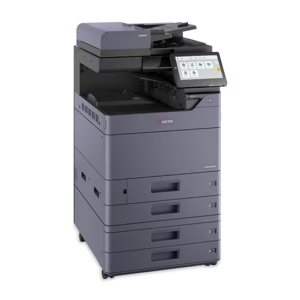
The Kyocera TASKalfa MZ2501ci and MZ3501ci are close enough that choosing between them should start with the office workload. Both belong to the current color TASKalfa MZ range. The useful question is whether the additional output speed solves a recurring bottleneck for your team, and what configuration each machine needs to complete your daily work.
We help South Florida businesses compare these models through our color multifunction copier listings. Use this decision process to narrow the choice before requesting pricing.
One useful record is the job that currently creates the longest ordinary wait. Note its page count, paper size, finishing and the time staff spend on the complete task. Bring that record to the comparison so the speed difference can be evaluated against a recurring problem rather than an isolated benchmark.
What the published speeds tell you
Kyocera specifies the MZ2501ci at up to 25 pages per minute for letter-size color and black-and-white output. The MZ3501ci is rated at up to 35 pages per minute on the same basis. Those figures provide a useful starting comparison because the paper size and output modes match.
They are not a promise that every office task will finish at that rate. File processing, warm-up, duplex work, paper selection, finishing and user interaction affect the complete job. Scanning has its own specifications and should be evaluated separately from print speed.
For a small team sending short documents throughout the day, additional engine speed may be less noticeable than it is for a shared copier producing repeated longer runs. Count the jobs that actually create waiting, not just the employees with access to the machine.
Three questions that usually narrow the choice
Does one deadline create a queue?
Look at the busiest ordinary morning or afternoon. If several employees regularly send substantial packets at once, record the size and timing of those jobs. A faster candidate deserves a practical test when the queue is delaying other work.
If most documents are one or two pages and staff rarely wait, investigate usability and configuration before deciding that a speed upgrade is essential.
Will the office grow during the agreement?
A planned additional department can change demand more than a modest increase in routine printing. Describe the expected new work: proposal sets, transaction packets, association materials or project documentation.
Separate a confirmed business change from a vague desire to “future-proof” everything. We can compare options against a realistic growth scenario without building the entire proposal around an unverified maximum.
Are the required accessories the same?
List the paper sources, document processor, finishing and other options your office needs on each candidate. Compare complete configurations. A less expensive base model with necessary accessories should not be evaluated against a more expensive machine that excludes them.
Test the documents that make people wait
Choose a short color document, your common multipage packet and a representative scan batch. Use the same files, paper and intended settings on each proposed configuration.
For print jobs, start timing when the task begins and stop when the usable document is ready to collect. Notice whether staff need to reload paper, change settings or separate output. For scanning, inspect the resulting file and destination as well as the time taken.
Write down what you observed. A demonstration becomes more useful when it answers a purchasing question rather than simply showing that both machines print a page.
Compare the installed system and the support plan
Review the MZ2501ci product details and MZ3501ci product details before asking for a side-by-side proposal. Current availability, selected accessories and the final service arrangement should be confirmed in writing.
Discuss the print volume expected under the agreement, color usage, supplies and how support requests will be handled. These factors affect the ownership or leasing experience after the initial model choice.
An office in Palm Beach County should also know which team will coordinate installation and ongoing support. We serve South Florida from Sunrise; selecting a model and selecting the provider behind it are connected decisions.
A practical way to make the final decision
Choose the configuration that meets the recurring workload with a clear reason for each feature. If the MZ2501ci handles the real jobs comfortably, document that result. If the MZ3501ci materially improves a repeated production task, document the benefit and compare the complete proposal.
We can help evaluate either model without assuming the faster machine is automatically the right answer. Request a Kyocera copier quote with your monthly usage, busiest document jobs, paper sizes and intended installation location. That information lets us recommend equipment around the way your business works.