

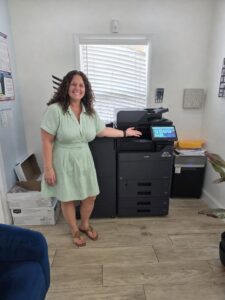
A copier for therapy offices should quietly support the people doing important work. One large South Florida family therapy organization recently upgraded to a new Kyocera MZ Series multifunction system after trusting STAT Business Systems for the past 20 years. We are proud to continue supporting a team that serves families throughout our community.
Twenty Years of Trust, Followed by the Right Upgrade
A long customer relationship is never just about replacing one machine with another. Over two decades, organizations grow, staff responsibilities change and paper-heavy processes become more digital. The equipment that worked for a smaller office may no longer match the number of users, daily scan volume or way documents need to move between departments.
For this family therapy organization, the latest Kyocera MZ Series upgrade provides a modern central system for everyday printing, copying and scanning. The goal is practical: keep administrative work moving so employees can spend less time dealing with office equipment and more time supporting the organization’s mission.
Choosing a Copier for Therapy Offices Based on the Real Workday
Therapy and behavioral health organizations can have several document workflows operating at once. Depending on the practice, staff may manage intake paperwork, referral documents, schedules, billing records, internal forms, training materials and community resources. A shared copier must be easy enough for occasional users while remaining capable enough for the administrative team that relies on it throughout the day.
Consistent Everyday Output
Forms, schedules and office documents should print clearly without staff repeatedly adjusting settings or waiting on a small desktop device.
Faster Scanning
Multi-page records and signed documents can be converted into digital files and directed to approved email addresses or network folders when configured for the organization.
Simple Shared Access
A clear touchscreen and properly installed print drivers make it easier for employees to use one central system without creating an informal office help desk.
Predictable Support
Local service, supplies and a clear upgrade path matter when an organization cannot afford to let routine administrative work stall.
A Modern Multifunction System Without Unnecessary Complexity
The Kyocera MZ Series brings printing, copying and scanning together in a business-class platform built for shared office use. Available models and configurations differ in speed, color capability, paper capacity, finishing and scan hardware, which is why we begin with the office workflow rather than a predetermined model number.
Organizations comparing equipment can review STAT’s current selection of Kyocera copiers and printers as well as our black-and-white multifunction copiers. We help determine whether an office truly needs color, how much speed is useful and which paper or scanning options will actually be used.
Copier Security Is Part of a Larger Privacy Process
Therapy organizations work in an environment where document privacy deserves careful attention. Depending on the selected MZ model and configuration, available controls may include user authentication, restricted functions, approved scan destinations, data protection settings and secure print workflows.
No copier by itself makes an organization HIPAA compliant. The device must be selected, configured and managed as part of the organization’s broader privacy, network security and records-handling policies. STAT can review copier capabilities and workflow requirements with the organization’s leadership or IT provider rather than making assumptions about how sensitive documents should move.
Why a 20-Year Local Service Relationship Matters
Office equipment is judged over years, not during the first week after installation. When an organization renews its relationship with us after 20 years, it reflects more than satisfaction with a particular copier. It reflects the importance of having a familiar local company available for equipment recommendations, installation, supplies, troubleshooting and future upgrades.
STAT has served South Florida businesses since 1986. Our copier leasing recommendations are based on real usage, and our local copier service team supports customers after the equipment is installed. We appreciate this family therapy organization’s continued loyalty and the opportunity to help keep its daily office workflow moving.
Signs Your Organization May Be Ready for an Upgrade
Find the Right Copier for Your South Florida Office
Tell us how many people use your equipment, what your team prints and scans, and where the current process slows down. We will help you compare Kyocera MZ Series options, lease terms and local service without pushing features your organization does not need.