

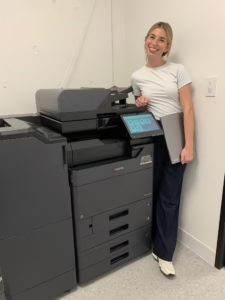
An A3 vs A4 copier comparison is not really about choosing the bigger machine. It is about matching paper size, monthly volume, scanning, finishing, floor space, and future growth to the way your office actually works.
Some South Florida businesses need a floor-standing multifunction copier that can handle 11 × 17-inch documents, multiple paper trays, and heavier workloads. Others would be better served by a compact A4 system that prints standard office documents quickly without taking up valuable space.
What Is the Difference Between an A3 and A4 Copier?
The labels describe the largest standard paper format the device is designed to handle. However, the distinction also usually reflects the overall size, configuration, and intended workload of the equipment.
Built for broader office workflows
A3-class multifunction copiers are commonly floor-standing systems. They can handle standard letter and legal documents as well as larger media, including 11 × 17-inch ledger output on many North American models.
They also tend to offer more paper sources, finishing options, scanning configurations, and capacity for shared departmental use.
Compact and focused
A4 systems are designed primarily for letter and legal-size business documents. Many fit on a desktop, cabinet, or small dedicated stand while still providing printing, copying, scanning, and optional faxing.
They are often a strong fit for smaller teams, executive areas, satellite offices, and workgroups that do not need ledger-size output.
Kyocera’s official overview of business printing solutions also explains that A3 devices provide broader paper-size flexibility, while A4 devices offer a more compact footprint.
A3 vs A4 Copier Comparison
| Office Requirement | A3 Copier | A4 Copier |
|---|---|---|
| Typical paper sizes | Letter, legal, ledger and other supported media | Primarily letter and legal |
| Installation | Usually floor-standing | Desktop, cabinet or compact stand |
| Monthly workload | Shared teams and higher-volume environments | Smaller workgroups and focused departmental use |
| Paper capacity | More trays and larger expansion potential | Lower capacity, although options vary by model |
| Finishing | More options for stapling, sorting, folding or booklet workflows | Usually simpler output handling |
| Best advantage | Flexibility and room to support complex document needs | Compact size and efficient everyday printing |
Five Questions That Make the Decision Easier
Do you print 11 × 17-inch documents?
Architecture, construction, real estate, education, finance, and professional services may use larger spreadsheets, plans, diagrams, booklets, or presentation materials. Even occasional ledger-size requirements can justify an A3 device when outsourcing or reformatting creates delays.
How many employees share the machine?
A compact A4 copier may serve a small team extremely well. However, a busy shared department may benefit from the larger paper capacity, stronger finishing choices, and workflow flexibility normally associated with an A3 multifunction copier.
What does your office scan every day?
Printing is only part of the decision. Consider scan volume, two-sided originals, mixed paper sizes, scan-to-email, scan-to-folder, searchable files, and how quickly batches must be processed.
Do you need advanced finishing?
Stapled document sets, sorted packets, folded materials, and booklet production can move the recommendation toward an A3 system. If employees mainly print individual reports, forms, and correspondence, an A4 device may be enough.
Will the office grow during the lease?
A copier that fits today may become a bottleneck after new hires, an office move, or increased client work. At the same time, buying far more machine than the business needs can create unnecessary expense. The best choice leaves reasonable capacity without oversizing the solution.
When an A4 Copier Is the Better Choice
An A4 copier can be the smarter solution when nearly every document is letter or legal size. It is also useful when floor space is limited, print volume is moderate, and the workgroup needs reliable printing and scanning without extensive finishing.
An A4 system may fit offices that:
- Print standard contracts, invoices, forms, reports, and correspondence
- Need a dedicated machine for one department or executive area
- Operate from a smaller office, reception area, or satellite location
- Want multifunction capability without a full-size floor-standing copier
Businesses comparing compact options can review STAT’s Kyocera copiers and printers and discuss whether a TASKalfa or ECOSYS configuration matches the workload.
When an A3 Copier Is Worth the Space
An A3 copier is usually the stronger choice when the machine acts as a central document hub. Larger workgroups often need additional paper trays, higher output capacity, fast scanning, flexible media support, and finishing that reduces manual document assembly.
A3 equipment may also provide a better growth path for businesses that expect rising print volume or more complex workflows. For example, a company may not use ledger paper every day, yet still need it for spreadsheets, diagrams, marketing pieces, or client packets.
STAT can compare color multifunction copiers and black-and-white multifunction copiers based on actual volume, document types, finishing, scanning, and budget.
Do Not Choose by Paper Size Alone
The A3 vs A4 copier decision should include more than the largest sheet the machine accepts. Two devices with similar print speeds can have very different paper capacity, scan performance, security features, user interfaces, and long-term operating costs.
Service also matters. A low equipment price is less valuable when supplies are difficult to manage or support is slow. Therefore, the quote should account for installation, network setup, training, maintenance, supplies, response expectations, and the cost of keeping the machine productive.
Why STAT recommends equipment by workflow
We ask how many people use the device, what they print, what they scan, the paper sizes involved, monthly volume, color requirements, and where the machine will be installed. That allows us to recommend practical copier leasing options rather than defaulting to the largest or least expensive model.
Compare A3 and A4 Copier Options
Tell STAT Business Systems about your paper sizes, monthly volume, scanning, finishing, users, and available space. We will help your South Florida business compare the right copier configurations with local installation and service support.
A3 vs A4 Copier FAQs
Is an A3 copier always better than an A4 copier?
No. An A3 copier provides more paper-size and configuration flexibility, but an A4 copier may be the better fit when an office only needs letter and legal documents, moderate volume, and a compact footprint.
Can an A4 copier print legal-size paper?
Many business A4 devices support legal-size paper, but capabilities vary by model and tray configuration. Confirm paper specifications before choosing equipment.
Does an A3 copier also print letter-size documents?
Yes. A3-class multifunction copiers are designed to handle standard office sizes such as letter and legal in addition to larger supported media.
Which copier is better for a small business?
The better copier depends on the small business’s paper sizes, monthly volume, scanning, finishing, users, available space, and growth plans. A compact A4 device may be ideal for one office, while another may need the broader capacity of an A3 system.