

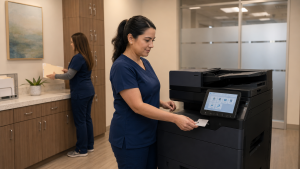
Security planning for healthcare document workflows
The phrase “HIPAA compliant copier scanning” can be misleading. A multifunction copier may provide valuable security capabilities, but compliance depends on the medical organization’s risk analysis, configuration, policies, employee practices and management of protected health information.
Copiers are networked information systems. They print records, scan documents, store address-book entries, communicate with email or file servers and may temporarily retain job data. For a medical, dental or specialty practice, that makes the device part of the broader security environment—not simply an office appliance.
The U.S. Department of Health and Human Services explains that a HIPAA Security Rule risk analysis considers systems and applications that access or house electronic protected health information. A copier or scanning platform that handles ePHI should therefore be evaluated within the organization’s documented risk-management process.
Four places copier security can break down
Physical placement matters as much as software. A secure-release feature offers limited protection if staff share badges or leave originals beside the device. Likewise, strong office procedures cannot compensate for an unsupported copier with outdated firmware and uncontrolled administrative access.
Build administrative and technical safeguards together
Administrative and physical controls
- Include copiers and scanning destinations in the formal risk analysis.
- Define which roles may print, scan, copy and administer the device.
- Place equipment away from unrestricted public or patient waiting areas.
- Train employees to verify recipients and collect originals and output promptly.
- Document incident reporting, service access and end-of-life procedures.
- Review third-party responsibilities and agreements with qualified advisors.
Device and network controls
- Use unique user authentication, PINs or supported badge access where appropriate.
- Consider secure print release for records that should not sit in an output tray.
- Restrict administrative access and replace default credentials.
- Use approved encrypted transmission methods and disable unused services.
- Evaluate storage encryption, overwrite and audit capabilities by model.
- Maintain supported firmware and coordinate changes with the IT security team.
HHS describes reasonable safeguards as part of limiting incidental uses or disclosures of protected health information. The appropriate controls depend on the organization and its risk analysis; there is no universal copier configuration that fits every practice. Device features must be enabled, tested and supported by operating procedures.
Follow protected information through the entire document lifecycle
1. Capture
Confirm that originals are handled by authorized staff, pages are counted and no records remain in the feeder or on the glass.
2. Authenticate
Use individual access methods where justified by the risk analysis. Avoid shared administrator credentials and uncontrolled address-book changes.
3. Transmit
Route scans only to approved email, folder, document-management or cloud destinations. Verify recipient permissions and transmission security.
4. Retrieve
Use secure release or controlled device placement when printed records could otherwise be viewed or collected by the wrong person.
5. Retain or remove
Apply the organization’s record-retention rules and address internal device data before return, resale, reassignment or disposal.
Pay special attention when equipment leaves the office
Lease returns, trade-ins, hard-drive replacements and service exchanges create a different risk than daily printing. The practice should know what storage the device contains, which sanitization functions apply and who documents completion. HHS guidance explains that properly implemented encryption can render electronic PHI unreadable to unauthorized individuals, but encryption does not replace a complete disposal and media-handling process.
Before relocation, return or disposal, document:
- Device make, model and identification number
- Internal storage and removable-media configuration
- Approved data overwrite or sanitization method
- Address-book and stored-job removal
- Administrator credential reset
- Chain of custody and responsible personnel
- Service-provider or leasing-company responsibilities
- Completion date and retained records
Choose equipment around the practice’s security plan
Current Kyocera copiers and multifunction printers can provide different combinations of authentication, secure print, network controls, data protection and workflow options. Capabilities vary by model and configuration, so required controls should be listed before equipment is selected.
STAT Business Systems can help healthcare organizations in Broward, Miami-Dade and Palm Beach compare appropriate color multifunction copiers, black-and-white multifunction copiers and local service options. We can coordinate device configuration with the practice’s IT team, security professionals and compliance advisors.
This article provides general office-technology guidance and is not legal or compliance advice. Each covered entity and business associate should evaluate its obligations with qualified legal, privacy and information-security professionals.
Make security requirements part of the copier quote
Tell us how your practice prints, scans and routes sensitive documents. We will help you identify relevant equipment capabilities and plan a configuration for your IT and compliance teams to review.
Request a medical office copier quoteCall STAT Business Systems at 954-321-1949.